The tool on this site will not open a GIF, and no section below alters that. Its accept list is PNG, JPEG, WebP, MP4, WebM and MOV; GIF is not on it, so the frames inside one are never reached. That is a boundary rather than a limitation to work around: a file the tool will not open is not a file it will half-open, and nothing below adds support for it.
What the page can do is take apart something the pages on this term tend to skate over. A GIF is neither a still nor a video. It holds a run of frames, every one of them a picture on its own, and the mark lives in the pixels of each frame instead of on a layer a file can name and turn off. That one fact decides what is and is not possible, and it is why the honest answer here is a route rather than a button.
Everything below follows from that one fact. A still export can be repaired exactly, because the pixels outside the mark are the pixels that went in. A clip can be repaired frame by frame, because the frames come out of a decoder and go back through an encoder. A GIF sits between the two: it is a run of frames, but the container is not one the tool reads, so the method that would suit its frames never gets to run on them.
A GIF keeps frames in a stack, not a picture with a layer on top
The format is older than the word “watermark” in most of the places people meet it, and its structure is simpler than a video's in one respect and more awkward in another. A GIF stores a sequence of frames, a colour table, and a disposal method that says what to do with the previous frame before drawing the next. Each frame is a raster: a grid of pixels, each pointing at an entry in a palette rather than carrying a full colour value of its own.
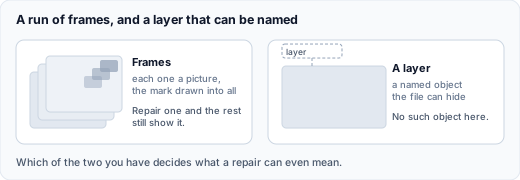
That has two consequences for a mark. The first is that the mark is not a separate object. It is pixels in the frame like everything else, drawn there by whoever exported the file, and there is no optional-content layer, no artifact label and no header object that holds it apart from the picture. A PDF can declare a watermark as a layer a reader may hide; a Word document stores it alongside the headers so one stored object repeats on every page. A GIF has no such place. The mark is simply part of the frame it was drawn into, and the same is true of the next frame and the one after it.
The second consequence is that “one image” is the wrong mental model. A ten-second GIF is not one picture with a moving part; it is a stack of pictures shown in order. Repairing the mark on one of them would leave it on the others, and the result would read as the mark flickering rather than the mark removed. Anything that works on a GIF has to work on the whole run of frames, and that is a different job from cleaning a single export.
Why a GIF never reaches the tool
The list this page can take is short, and it is meant to be short. A still in PNG, JPEG or WebP, or a clip in MP4, WebM or MOV, handled in the tab you already have open. A GIF is not on it, and the list is a boundary rather than a starting point.
The arithmetic is reverse alpha blending — it solves the compositing equation backwards to recover what sat under a known overlay. It wants the frame exactly as the generator wrote it, the mark laid on top at full precision, and an overlay the tool already has a record of. A still export supplies all three. A clip supplies them frame by frame, and the same box is rewritten on each. A GIF supplies none of them: the container is not one the tool reads, so its frames are never handed to the method at all.
GIF support is not here, and nothing on this page should be taken as a promise that it is on its way. The short answer is the honest one: a GIF is not a file this site can take.
What actually helps with a GIF
- If the mark is a fixed visible badge, turn the GIF into a clip first. A GIF can be exported as MP4 or WebM, and a clip is a format the tool does open. The catch is the same one the video page sets out: the clip path holds one box for the whole run, so it suits a badge that stays in one place, not a mark that travels with the motion. Converting a GIF to a clip and back is also lossy, and the round trip is worth knowing about before you start.
- If the mark is in a corner you meant to cut off anyway, trimming each frame is the least complicated fix — and it costs you part of the picture and a changed frame. Putting your own element over the mark makes the same bargain with a different shape.
- If the mark moves, or the framing matters, a GIF-specific editor is the right instrument. Frame-by-frame editing and re-export is what the format supports, and it is a different class of tool from the one on this page.
- If the asset can be re-sourced, that is usually better than repairing it. A clean original costs less than a repair, and it does not carry the artefacts a repair leaves behind.
The short version
The tool on this site does not open a GIF. If the mark is a badge that holds one position, export the GIF as MP4 or WebM and use the clip path, knowing the result is re-encoded rather than identical. If the mark moves or the framing matters, use a GIF-specific editor. If you can get the original asset, that beats both. What none of those routes does is remove an invisible mark, because a GIF does not carry one in the sense this site uses the word.
Sources
- W3C, Graphics Interchange Format (GIF) Specification, Version 89a. Source of the description of a GIF as a stream of frames with a global or local colour table, of the indexed colour model in which each pixel points at a palette entry, and of the disposal methods that decide what happens to the previous frame before the next is drawn. Used for the container description, not as a claim about any particular file.
- Our own tool's behaviour, measured on this site: a still in PNG, JPEG or WebP and a clip in MP4, WebM or MOV are both taken, and a GIF file is not. The accept list on the page is the same one the file input declares.
- Our own observation of the results returned for this term, checked 17 October 2026. Described as a pattern only: no site is named, no ranking position is claimed, and no page's wording is reproduced.